
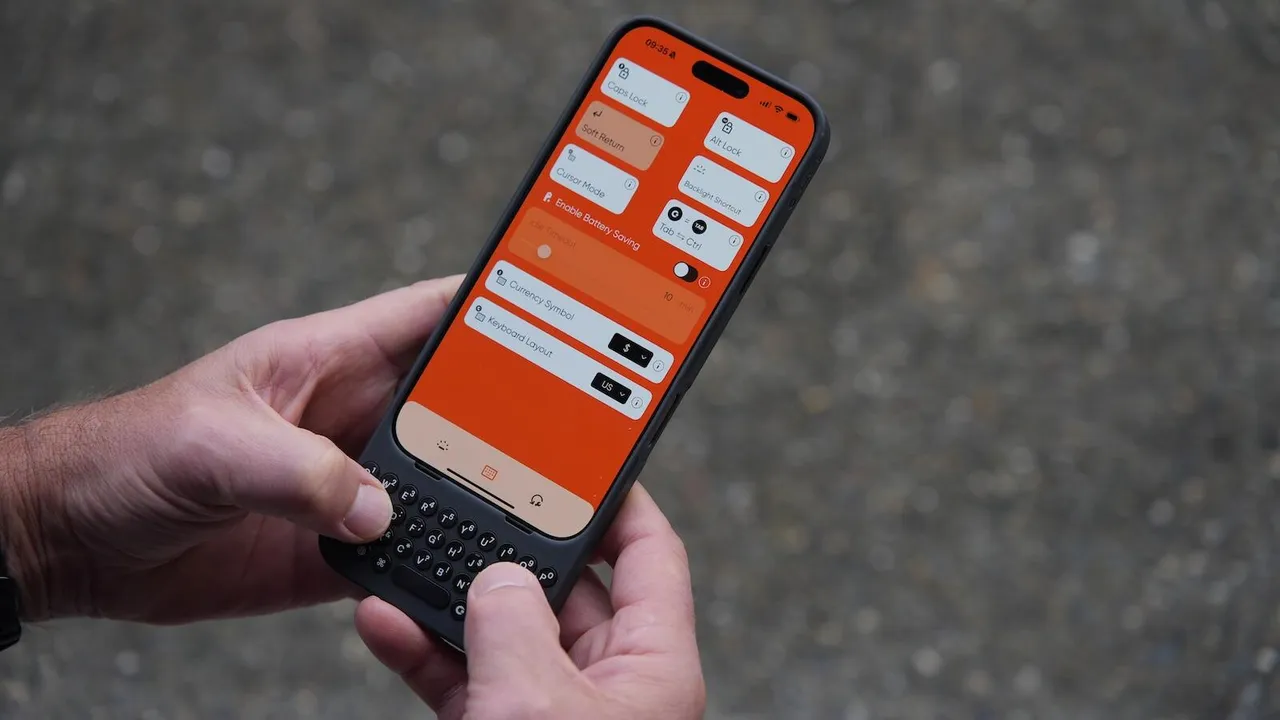
Remember the days when the “CrackBerry” was the ultimate status symbol for the busy professional? That satisfying physical click-clack of keys was the soundtrack of getting things done. Then, the smartphone revolution ushered in the era of the touchscreen—sleek, minimalist, and incredibly versatile. But for many of us, especially those who type long emails, draft reports, or manage complex projects on the go, the virtual keyboard has always been a compromise. It’s a trade-off between the stunning, all-screen design of our devices and the tactile efficiency we crave. But what if you didn’t have to choose? What if you could have the breathtaking display of your iPhone 16 and 17 Pro Max and, in an instant, the productivity powerhouse of a physical keyboard? This isn’t a nostalgic dream; it’s the reality being forged by a new generation of sophisticated keyboard cases. This article dives deep into this exciting accessory category, moving beyond basic specs to give you a masterclass in how to select, use, and master a keyboard case to truly transform your most powerful pocket computer.
The Unmet Promise: Why Your Thumbs Are Begging for an Upgrade
Let’s be brutally honest for a moment. The on-screen keyboard on the iPhone 16 and 17 Pro Max is a marvel of software engineering. It’s responsive, intelligent, and supports a myriad of gestures. But for any task beyond a quick text message or a brief search query, it falls short. The lack of physical feedback leads to a higher error rate, forcing you to constantly look at the keys instead of the content. This “hunt-and-peck” method murders your workflow’s momentum. Furthermore, the keyboard consumes nearly half of that gorgeous Super Retina XDR display, leaving you with a cramped window to actually see your work. This is the fundamental paradox of the modern smartphone: it’s a device capable of incredible creation, hindered by an inefficient primary input method. A dedicated keyboard case shatters this paradox. It reclaims your screen real estate and provides the mechanical confidence to type faster and more accurately, effectively bridging the gap between the convenience of a phone and the productivity of a laptop.
More Than Just Keys: Deconstructing the Modern Keyboard Case
Today’s keyboard cases are a far cry from the bulky, plasticky accessories of yesteryear. They are feats of industrial design, meticulously engineered to complement the premium feel of your device. When evaluating an option for your iPhone 16 and 17 Pro Max, you need to look at a symphony of components, not just the keys themselves.
- The Typing Mechanism: This is the heart of the experience. Scissor-switch mechanisms are the gold standard, offering a short, crisp, and quiet key travel that mimics a premium laptop. Avoid mushy, rubber-dome keys that feel cheap and unresponsive.
- Connectivity and Power: The best cases use Bluetooth Low Energy (BLE) for a seamless, energy-efficient connection. The big question is battery life. Look for cases that promise weeks or even months of use on a single charge, and preferably use a USB-C port to align with the charging cable you already use for your phone.
- Build Quality and Protection: The “case” part is just as important as the “keyboard” part. It should be a rugged guardian for your $1,000+ device. Look for materials like polycarbonate shells and shock-absorbent TPU liners, coupled with raised bezels to protect the screen and camera array when laid flat.
- The Hinge and Kickstand: This is the unsung hero of the design. A robust, multi-angle hinge is non-negotiable. It must hold your iPhone 16 and 17 Pro Max securely at any angle, from a shallow typing position on a desk to a near-upright stance for watching videos.
A Buyer’s Guide: Navigating the Market for Your Perfect Match
With a clear understanding of what makes a great keyboard case, how do you find “The One”? The market isn’t flooded with options, which is a good thing—it means the players are specialized. Brands like Brydge, Logitech, and ZAGG often lead the pack. Your decision should hinge on your personal workflow and aesthetic preferences. Ask yourself these questions: Are you a writer who needs a near-laptop replacement for drafting on the go? Prioritize key travel and layout. Are you a frequent traveler who needs maximum protection? Focus on drop-test certifications and ruggedness. Do you use your phone for media consumption just as much as typing? Ensure the kickstand is versatile and the audio isn’t muffled. Don’t just watch a single review; scour user testimonials for long-term reliability reports. The perfect case is the one that feels like a natural extension of your device and your ambitions.
Mastering the Workflow: Pro Tips for Keyboard Case Power Users
Owning a tool and mastering it are two different things. Simply having a keyboard attached to your iPhone 16 and 17 Pro Max won’t automatically make you more productive. You need to integrate it into your digital habits. First, learn the essential keyboard shortcuts. On iOS, Cmd + Tab lets you switch between apps instantly, Cmd + Space opens search, and Cmd + H takes you home. In specific apps, the shortcuts are even more powerful. In Google Docs or Pages, you can format text, add comments, and navigate documents entirely by keyboard. Second, consider your posture. The beauty of this setup is its flexibility. Don’t just use it on a desk. Prop it up on a kitchen counter while following a recipe, on your lap during a commute, or on a stand next to your monitor as a dedicated messaging terminal. Finally, pair it with a cloud-synced note-taking app like Bear, Evernote, or Apple Notes. This creates an instantaneous capture system—your ideas flow from your mind, through the physical keys, and into the cloud, accessible from any device moments later.
The Software Symbiosis: iOS and Your New Keyboard
The integration between these accessories and iOS is deeper than you might think. Once paired, your iPhone 16 and 17 Pro Max recognize the keyboard as a native input device. The on-screen keyboard intelligently disappears, giving you that full-screen view. The standard iOS shortcuts work system-wide, but many third-party keyboard case manufacturers develop their own companion apps. These apps can allow for remapping keys, adjusting backlighting (a feature to definitely look for in a case), checking battery levels, and even creating custom macros for complex strings of text or actions. This level of software-hardware symbiosis is what elevates a good accessory into a great one. It’s no longer just a peripheral; it’s a partner that enhances the core functionality of your device.
Beyond Typing: The Unexpected Use Cases
While typing is the primary function, the utility of a keyboard case for the iPhone 16 and 17 Pro Max extends far beyond documents and emails. For social media managers and content creators, the ability to type long captions, replies, and comments with speed and accuracy is a game-changer. For programmers and students, being able to write snippets of code or take detailed, fast-paced lecture notes without the bulk of a laptop is incredibly liberating. It also serves as a fantastic mobile command center for remote desktop applications like TeamViewer or Parallels Access, giving you a physical keyboard to control your home or office computer with precision. In this context, the case transforms your phone into a true desktop replacement in a pinch.
Addressing the Elephant in the Room: Trade-offs and Considerations
Is it all sunshine and mechanical keystrokes? Of course not. Adding a keyboard case fundamentally changes the form factor of your sleek smartphone. It adds significant bulk, weight, and thickness. Your once-pocketable device becomes a chunky wedge. You also need to manage the battery of another device, albeit one that lasts a long time. Some cases can also slightly muffle the bottom-firing speakers. It’s a trade-off: you are sacrificing a degree of portability and minimalist design for a massive boost in functional utility. The key is to see the case not as a permanent fixture, but as a modular tool. It clicks on when you have serious work to do, and it comes off when you’re heading out for the evening and want your phone to be slim and light. This modular mindset is the best way to approach this accessory.
The Future of Input: Where Do We Go From Here?
The development of keyboard cases for flagships like the iPhone 16 and 17 Pro Max points to a broader trend in personal computing: the hybridization of devices. The line between phone, tablet, and laptop is blurring. We are moving toward an era where your computing power is in your pocket, and you simply dock it to different form factors—a larger screen at work, a keyboard for productivity, a TV for entertainment. Could future cases incorporate haptic feedback that simulates key travel even more realistically? Might we see E-ink secondary displays on the back for notifications? The potential for innovation is vast. This isn’t just a niche accessory; it’s a glimpse into a more flexible and powerful way of working.
Final Verdict: Is a Keyboard Case the Right Investment for You?
So, should you buy a keyboard case for your iPhone 16 and 17 Pro Max? The answer is a resounding “it depends.” If your phone is primarily a consumption device for browsing, social media, and videos, you likely don’t need one. But if you are a professional, a student, a writer, or anyone who regularly creates content or communicates at length on their phone, this accessory can be one of the most impactful purchases you make. It won’t replace your laptop for everything, but it will significantly reduce your dependency on it, freeing you to work effectively from anywhere. It’s an investment not just in a piece of hardware, but in your own productivity and creative potential.
Frequently Asked Questions (FAQ)
Q: Do keyboard cases work with all apps on my iPhone?
A: Yes, they work system-wide. Any app that uses the standard iOS virtual keyboard will automatically recognize the physical keyboard and hide the on-screen one.
Q: How is the lag, and is the connection reliable?
A: Modern Bluetooth Low Energy (BLE) technology has made lag virtually imperceptible for typing. The connection is generally very stable once paired, with quick automatic reconnection when you open the case.
Q: Can I still use Face ID and access all the ports and buttons?
A: High-quality cases are precision-machined to offer full access to all buttons, ports (including the charging port), speakers, and the TrueDepth camera system for Face ID. Always check the product specifications to be sure.
Q: Will using a keyboard case drain my phone’s battery?
A: The Bluetooth connection uses a negligible amount of power from your phone. The keyboard case has its own internal battery that needs to be charged separately, typically lasting for weeks between charges.
Q: Are these cases protective enough for everyday use?
A: Absolutely. In fact, one of their primary functions is protection. They typically offer military-grade drop protection (like MIL-STD-810G) and have raised edges to safeguard your screen and cameras.
Let’s Keep the Conversation Going!
What’s your biggest hesitation about using a keyboard case? Are you a former BlackBerry user feeling a sense of nostalgia, or a digital native ready to supercharge your iPhone? What specific tasks would a keyboard help you accomplish? Share your thoughts, questions, and experiences in the comments below—I read and reply to every one!


